|
|
|
|
|


Payment Inquiry (For Death Case)
This topic has been updated to add a note to ensure error free processing.
Payment Inquiry is option on the Death Case Menu. This option is used to query payments that have been disbursed and the amount remaining to be disbursed.
To Access Payment Inquiry Screen:
- Type at the Select Option (1-7) prompt on the Death Case Menu.
- Press . The payment Inquiry screen is displayed showing the amounts to be disbursed.

To View Claimant Disbursement Totals:
- At the Payment Inquiry screen, press . The Payment Inquiry (totals) screen is displayed. This screen (1) displays the payments disbursed to each beneficiary claimant, (2) displays the amount of indebtedness, (3) displays the calculated amount to be disbursed to the beneficiary claimant, and (4) displays the disbursements to date and the amount remaining to be disbursed.

- Press , to process the totals. (Total monies to be disbursed minus employee indebtedness.)
To View Claimant Disbursement Data:
- At the Payment Inquiry screen 1 of 3, press . The payment Inquiry By Claimant screen is displayed. This screen displays disbursement data for each beneficiary claimant.
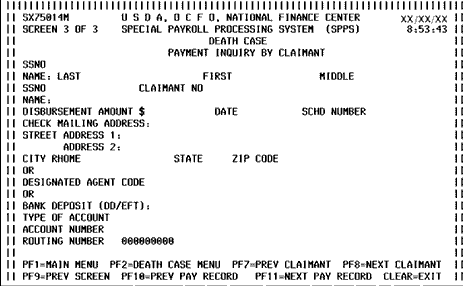
At the Payment Inquiry screen 1 of 3, press the button. The payment Inquiry By Claimant screen is displayed. This screen displays disbursement data for each beneficiary claimant. Change (1 of 3) for (2 of 3).
Follow instructions at the bottom of the screen. Press the button to move to the next pay record. Press the button to move to previous pay period.
See Also |