|
|
|
|
|


Employee Status Report
Employee Status Report is Option 1 on the Funds Control System - Salaries and Benefits screen. This option provides a complete employee payroll status report by pay period showing earnings and Government contribution totals processed through CAS. This report can be retrieved by org, name, or SSN of employee within the specified organization.
To Select This Option:
- Type or at the prompt on the Funds Control System - Salaries and Benefits screen.
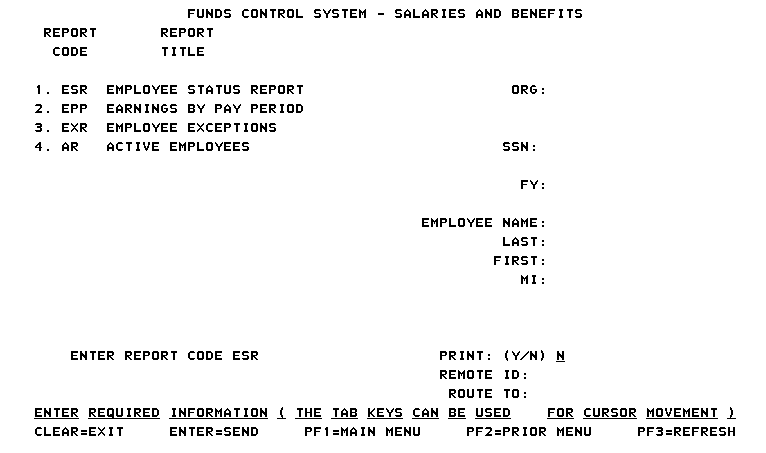
- Complete the fields as follows:
Field
Description/Instruction
ORG:
Type the organization code.
SSN:
Type the SSN. Separated or transferred employees must be query by SSN.
FY:
Type the applicable fiscal year. If this field is left blank, the system defaults to the current fiscal year.
Employee Name:
Not applicable.
Last:
Type all or part of the last name. If part of the last name is entered, an employee list is displayed. Type next to the name. Press .
First:
Type the first name.
MI:
Type the middle initial. Press .
Print:
Defaults to Y (yes) to remote print.
Remote ID:
Type the data to identify who requested the report (e.g., name, bin number).
Route To:
Type the data to identify who requested the report (e.g., name, bin number).
- Press . The Employee Status Report screen is displayed.
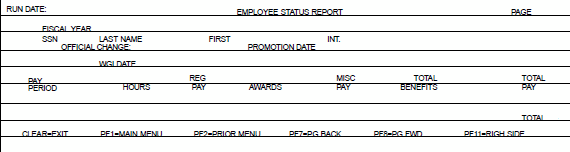
The output report is displayed showing the following fields:
Field |
Description |
|---|---|
Fiscal Year |
Fiscal year. |
SSN |
Employee's SSN. |
Last Name |
Employee's last name. |
First |
Employee's first name. |
Int. |
Employee's middle initial. |
Official Change |
System generated. |
Promotion Date |
System generated. |
WGI Date |
System generated |
Pay Period |
Pay periods processed during the current fiscal year are displayed. |
Hours |
Regular hours processed for each pay period is displayed. |
Reg Pay |
Amount processed for object classes 1101-1149, 118X, and 13XX is displayed. |
Awards |
Amount processed for object classes 115X is displayed. |
Misc Pay |
Amount processed for overtime and object classes 116X, 117X, and 119X is displayed. |
Total Benefits |
Total amount processed for benefits object class 12XX (the right side of report provides the benefit breakdown.) |
Total Pay |
Total amount processed for all previously mentioned categories is displayed. |
Total |
Total for all pay periods for each employee is displayed. |
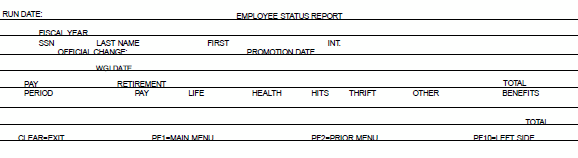
The following fields are displayed:
Field |
Description/Instruction |
|---|---|
Fiscal Year |
Fiscal year. |
SSN |
Employee's SSN. |
Last Name |
Employee's last name. |
First |
Employee's first name. |
Int. |
Employee's middle initial. |
Official Change |
System generated. |
Promotion Date |
System generated. |
WGI Date |
System generated. |
Pay Period |
Pay periods (beginning with PP 20) which processed during the current fiscal year are displayed. |
Retirement Pay |
Amount processed for retirement is displayed. |
Life |
Amount processed for life insurance is displayed. |
Health |
Amount processed for health insurance is displayed. |
Hits |
Amount processed for Hospital Insurance Tax is displayed. |
Thrift |
Amount processed for the Thrift Savings Plan (Government portion) is displayed. |
Other |
Amounts processed for any category other than those listed above are displayed. |
Total Benefits |
Total amount for all benefits categories is displayed. |
See Also |