|
|
|
|
|


Deleting a Carrier Contact Record
The Delete function allows users to delete carrier contact records.
To Delete a Carrier Contact Record:
- Select the tabat the top of the CLER Main Menu.
- Select the option. The Contacts Main Page is displayed with the and options.
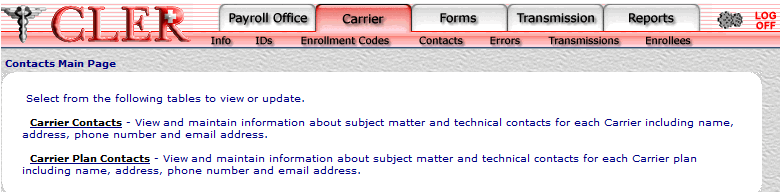
- Select the option. The Carrier Contacts page is displayed.
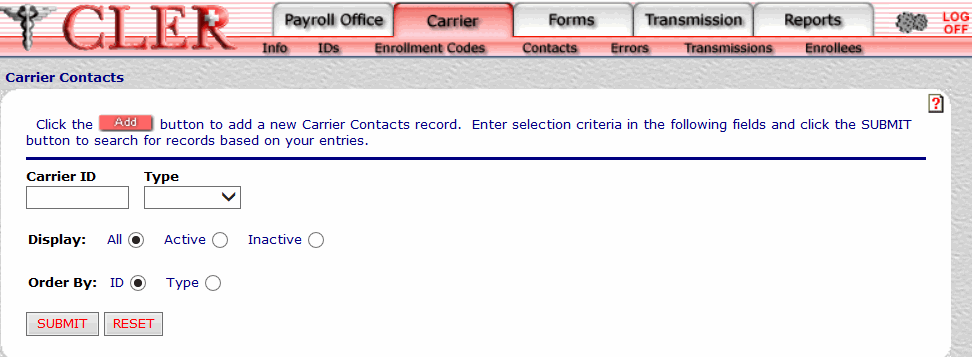
- Complete the fields as follows:
Field
Instruction/Description
Carrier ID
Required, alphanumeric, 7 positions
Enter the carrier identification code assigned by NFC’s CLER Operations and Reconciliation Unit.
Type
Optional
Select either for an administrative contact or for a technical contact from the drop-down menu. The Type code indicates whether the payroll office contact is an administrative contact or a technical contact.
Display
Optional, default
Defaults to the display option. Allows users to display search results by the options listed below. To choose another type of option, select the radio button next to one of the following options:
- Displays all contacts for the payroll office ID and type code entered.
- Displays active contacts for the payroll office ID and type code entered.
- Displays inactive contacts for the payroll office ID and type code entered.
Order By
Optional, default
Defaults to the sort option. Allows users to sort search results by the options listed below. To choose another sort option, select the radio button next to one of the following options:
- Search by identification number.
- Search by type code.
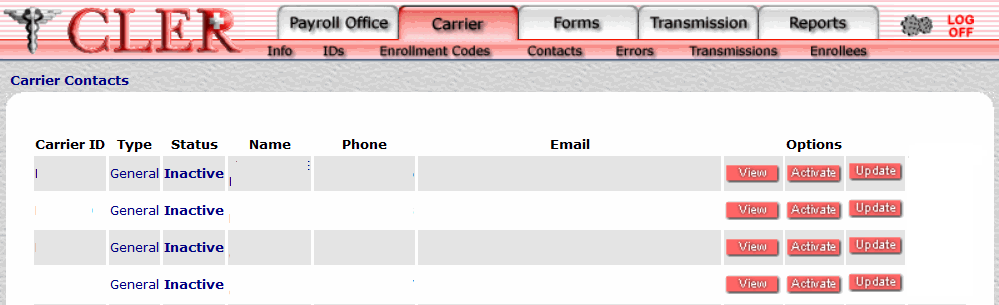
- Click . The Carrier Contacts Search Results page is displayed.
Field
Instruction/Description
Carrier ID
System generated
Displays the carrier identification code assigned by NFC's CLER Operations and Reconciliation Unit.
Type
System generated
Displays type code to indicate that the payroll office contact holds an administrative position.
Displays type code to indicate that the payroll office contact holds a technical position.
Status
System generated.
Displays to indicate that the record has been activated in CLER.
Displays to indicate that the record has been inactivated in CLER.
Name
System generated
Displays the name of the carrier contact.
Phone
System generated
Displays the carrier contact's telephone number.
Email
System generated
Displays the carrier contact's email address.
- Click next to the applicable record. A pop up message is displayed asking the user to approve the deletion.
- Click to delete the record and close the pop up.
See Also |