Create Leave Slip
The Create Leave Slip option on the Options drop-down list allows users to create leave slips as PDF files.
- To create a leave slip, from the Leave Calculator page, select Create Leave Slip from the Options drop-down list.
- Select the day(s) in the calendar to create the leave slip.
Note: The day(s) selected must contain an existing leave entry.
- Select GO. The Leave Calculator with Make Leave Slip page is displayed.
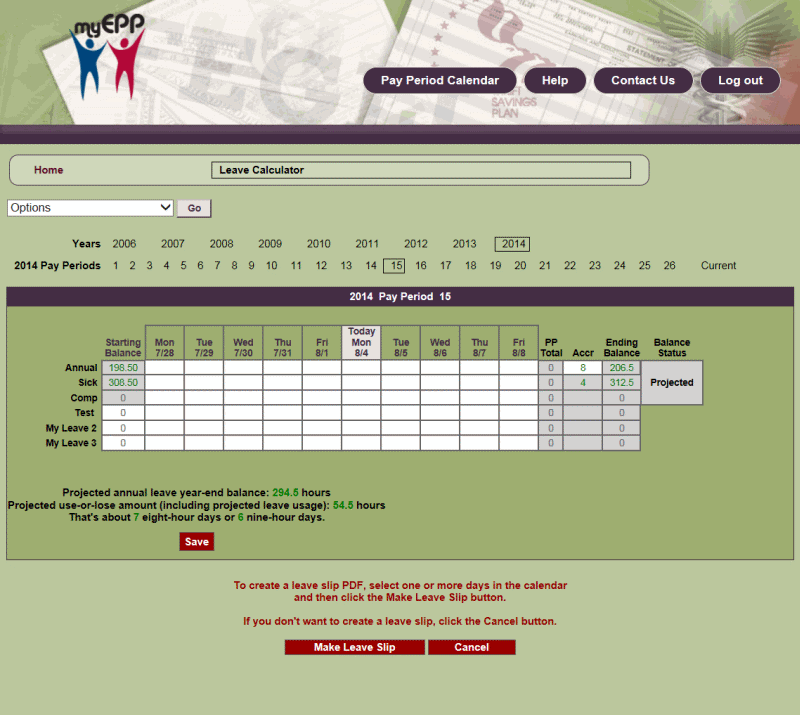
Figure 42: Leave Calculator with Make Leave Slip Page
- Select Make Leave Slip to create a leave slip for the days selected. The Leave Slip with the selected leave data is displayed in PDF form. The user has the option to edit and save the leave slip before printing.
OR
Select Cancel to cancel the action.