Change User ID
The Change User ID option allows the user to change their user ID.
- To change your user ID, on the EPP Home page (with Preferences folder expanded), select Change User ID to change your user ID.
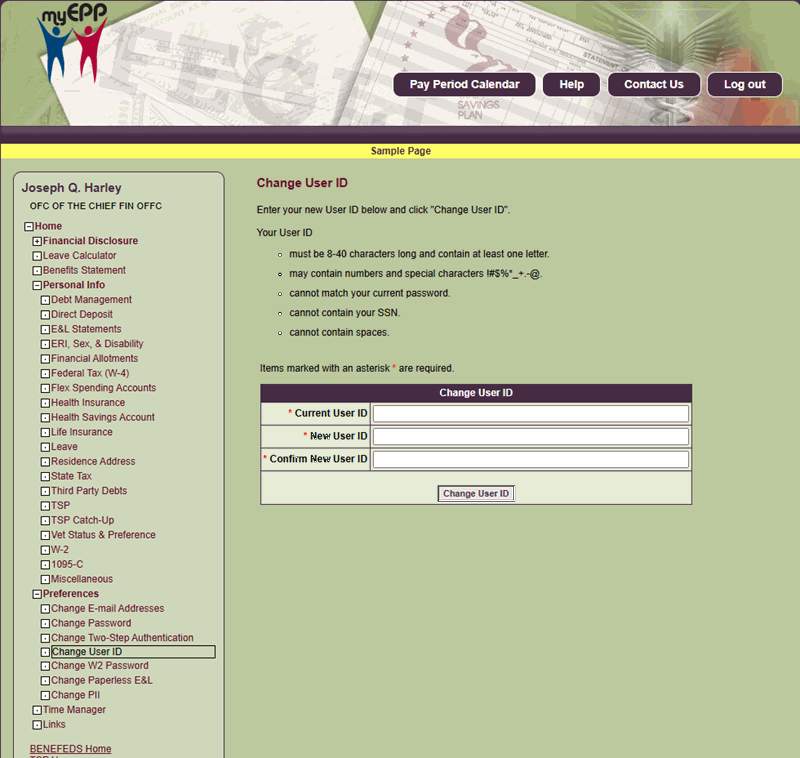
Figure 138: Change User ID Page
- Complete the fields as follows:
Current User ID Field Instruction
Confirm New User ID Field Instruction
- Select the Change User ID button to change the user ID.
Note: All emails that are generated from EPP will be sent from the NoReply@usda.gov email address. That email box is not monitored. Any questions should be directed to the NFC Contact Center at 1-855-632-4468 or your Personnel or Payroll Office.