Entering State Tax Data
- To enter state tax, select Payroll Documents menu group.
- Select the Tax Data menu group. The Tax Data page - Find an Existing Value is displayed. The information on this page will allow the user to locate an existing employee in order to enter or change tax data.
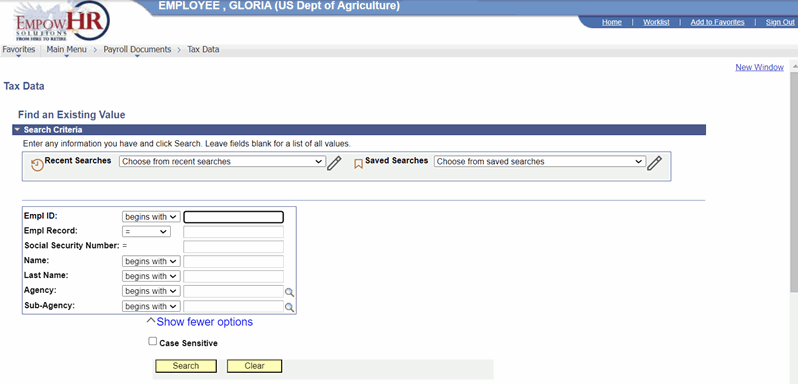 Figure 44: Tax Data Page - Find an Existing Value
- Enter the search criteria.
- Select the Search button. A page is displayed with tabs for city, county, State, and Federal taxes.
- Select the State Tax Data tab. The State Tax Data tab is displayed.

Figure 45: State Tax Data Tab
- Complete the fields as follows:
|
Field |
Description/Instruction |
|---|---|
|
Name |
Populated from the search criteria. The name of the employee is displayed from the Empl ID entered. |
|
Empl ID |
Populated from the search criteria entered. |
|
Record |
Displays the number of records for the employee. |
|
SSN |
Populated from the search criteria entered. The employee SSN is displayed based on the Empl ID. |
- Complete the State Tax Data fields as follows:
|
Field |
Description/Instruction |
|---|---|
|
Effective Date |
Required field. Populated with the beginning date of the current pay period. Enter a date or select a date from the calendar icon. This is the date on which a table record becomes effective; the date that an action begins. This date also determines when to view or change information. Select a date from the calendar icon to change the default date. |
|
Pay Period |
Populated and cannot be changed. |
|
Date Entered |
Populated with the beginning date of the current pay period or select a date from the calendar icon. |
|
User ID |
Populated with the system identifier and name of the individual who generates the transaction. |
|
Transaction Status |
Defaults to In Progress. Select the down arrow to select a different status. |
- Complete the Exemption Data fields as follows:
|
Field |
Instruction |
|---|---|
|
State tax withholding state code |
Enter the applicable two numeric positions for the State in this field. The State name is displayed. |
|
Total Number Of Allowances |
Enter the total number of allowances claimed (three numeric positions). Select the NFC Tax Instructions link for more tax information. |
|
Additional Withholding Amount |
Enter the amount in dollars and cents to be withheld in addition to the amount withheld in accordance with the tax formula. |
At this point, the following options are available:
|
Step |
Description |
|---|---|
|
Select the Save button |
Saves the new data entered. |
|
Select the Return to Search button |
Returns the user to the applicable page to search for another record. |
|
Select the Previous in List button |
Returns to the previous person on the list. |
|
Select the Next in List button |
Advances to the next person on the list. |
|
Select the Notify button |
Notifies the next individual in the workflow. |
|
Select the Previous Tab button |
Views the data on the previous tab. |
|
Select the Next Tab button |
Views the data on the next tab. |