Entering Federal Income Tax Data
- To enter federal tax, select Payroll Documents menu group.
- Select the Tax Data menu group. The Tax Data page - Find an Existing Value is displayed. The information on this page will allow the user to locate an existing employee to enter or change tax data.
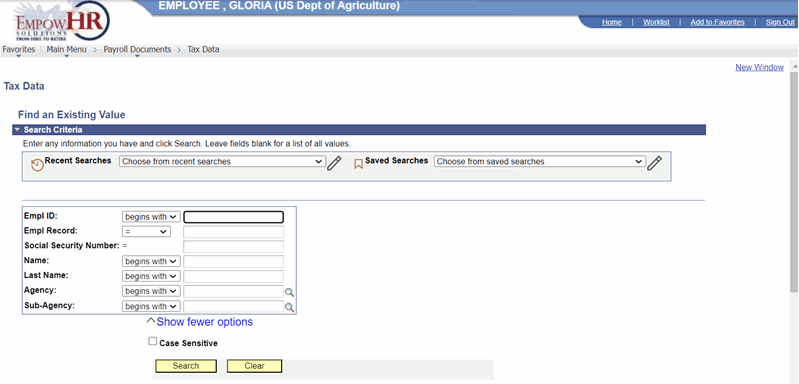 Figure 46: Tax Data - Find an Existing Value
- Enter the search criteria.
- Select the Search button. A page is displayed with tabs for city, county, State, and Federal taxes.
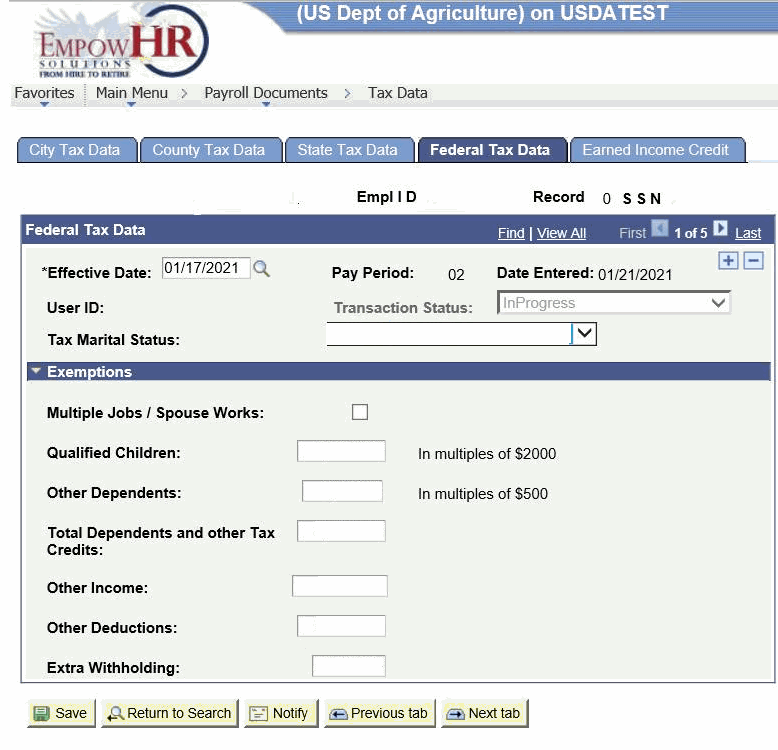
Figure 47: Federal Tax Data Page
The following fields are displayed:
|
Field |
Description/Instruction |
|---|---|
|
Name |
Populated from the search criteria. The name of the employee is displayed from the Empl ID entered. |
|
Empl ID |
Populated from the search criteria entered. |
|
Record |
Displays the number of records for the employee. |
|
SSN |
Populated from the search criteria entered. The employee SSN is displayed based on the Empl ID. |
- Complete the Federal Tax Data fields as follows:
|
Field |
Description/Instruction |
|---|---|
|
Effective Date |
Required field. Populated with the beginning date of the current pay period. This is the date on which a table record becomes effective; the date that an action begins. This date also determines when to view or change information. Select a date from the calendar icon to change the default date. |
|
Pay Period |
Populated and cannot be changed. |
|
Date Entered |
Populated with the current date. |
|
User ID |
Populated with the system identifier and name of the individual who generates the transaction. |
|
Transaction Status |
Select the down arrow to select the applicable status. |
|
Tax Marital Status |
Select the applicable status from the drop-down list. The valid values are Exempt, Married filing jointly, Married filing separately, and Nonresident Alien. |
- Complete the Exemption fields as follows:
|
Field |
Instruction |
|---|---|
|
Multiple Jobs/Spouse Works |
Select the box that will store as "Y" when checked or "N" when unchecked. |
|
Qualified Children |
Enter the whole dollar amount only in multiples of $2000 for each qualified child claimed. This field will be hidden when importing in non-originated applied tax documents. |
|
Other Dependents |
Enter the whole dollar amount only in multiples of $500 for each additional dependent child claimed. This field will be hidden when importing in non-originated applied tax documents. |
|
Total Dependents and other Tax Credits |
Enter the total of the Qualified Children and Other Dependents fields. |
|
Other Income |
Enter any tax withheld for other income. This may include interest, dividends, and retirement income |
|
Other Deductions |
Enter the total of other deductions. |
|
Extra Withholding |
Enter the Extra Withholding amount in whole dollars. |
At this point, the following options are available:
|
Step |
Description |
|---|---|
|
Select the Save button |
Saves the new data entered. |
|
Select the Return to Search button |
Returns the user to the applicable page to search for another record. |
|
Select the Previous in List button |
Returns to the previous person in the list. |
|
Select the Next in List button |
Advances to the next person in the list. |
|
Select the Notify button |
Notifies the next individual in the workflow. |
|
Select the Previous Tab button |
Views the data on the previous tab. |
|
Select the Next Tab button |
Views the data on the next tab. |